
Exported reports use your selected units and time zone settings. Reports are available to download for 7 days; after this period, the link will expire and a new report must be generated. Shared links can be accessed by anyone, even without a BloodCOMM account.
PDF Export Options
Exported reports are not automatically logged on the timeline. To keep a record of when a report was exported and who it was sent to, use the "Email Report" event on the Blood Dashboard. This will log the email event on the timeline, including recipient and timestamp.
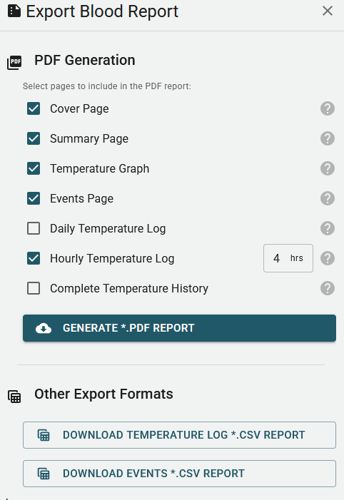
When exporting a Blood Report, you can select which pages to include in the PDF, or choose to export as a CSV file. The available options include:
- Cover Page
- Includes the Blood Bag label and summarized information.
- Summary Page
- Overview of the Blood Bag status and history.
- Temperature Graph
- Visual graph of the temperature history.
- Events Page
- List of all events related to the Blood Bag.
- Daily Temperature Log
- Daily temperature records. Exported data will show the minimum, maximum, and average temperatures for each day.
- Hourly Temperature Log
- Hourly temperature records, grouped by selected hour. You may group by any time range between 1 and 23 hours. Exported data will show the minimum, maximum, and average temperatures for the selected range.
- Complete Temperature History
- All temperature logs and events.
CSV Export Formats
You may export the report in the following CSV reports. CSV Exports are immedately downloaded and not stored on the BloodCOMM Server.
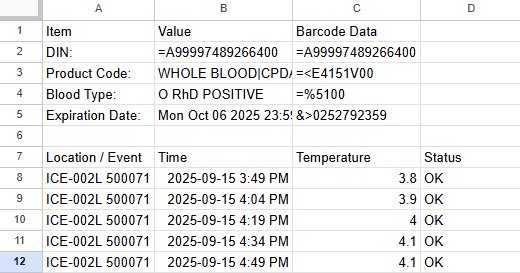
- Temperature Log
- A complete record of temperature readings over time.
- Event History
- A complete record of all events related to the blood unit. This is the same export as is able to be download from the Cold Chain Timeline.
The date range for the report cannot be edited. Each export covers the complete cold chain, from the initial check-in to the final event.