
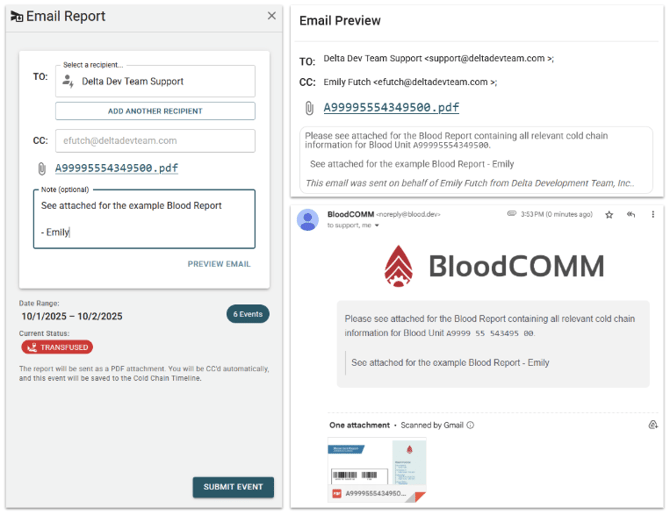
The recipient field uses Smart Autocomplete to suggest external users and organizations previously contacted. If you do not see the recipient you need, you may enter a new name and email address, which will prompt you to provide additional details.
Sending a Blood Unit Report
To send a report:
- Select or enter the recipient(s) using Smart Autocomplete. You may add multiple recipients.
- Your email will be automatically CC'd and shown in the CC field.
- Generate the PDF report by clicking "Generate PDF Report". You may preview the report before sending.
- Optionally, add a note to include with the report.
- Once ready, send the report. The event will be logged on the timeline, including the time sent, recipients, and any note.
The PDF report must be generated before sending. You may preview the email and report before finalizing. All sent reports are attached to the Cold Chain Timeline for audit and tracking purposes.