
BloodCOMM Supports connecting to and managing the following devices:
- Bluetooth Connectivity
- Delta Development Team - APRU-006L
- Delta Development Team - ICE-002L
- Cloud Connectivity
- Delta Development Team - APRU-006L
- Only available via the BloodCOMM Connect Accessory
- Delta Development Team - ICE-002L
- Delta Development Team - APRU-006L
BloodCOMM requires connecting to a device via Bluetooth or via the Internet in order to function. All application features revolve around the embedded temperature sensors and records measured by connected devices.
Interested in purchasing a BloodCOMM-enabled device? Contact Delta Development Sales
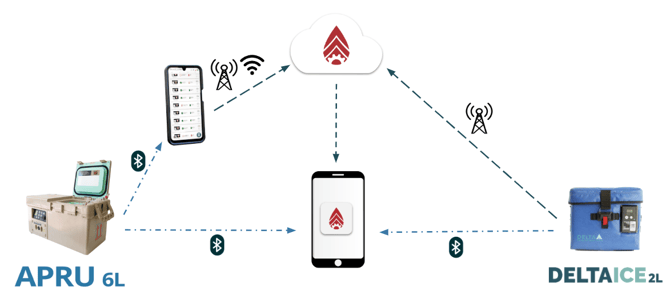
Each BloodCOMM-enabled device has the ability to record and report temperature data and status. Devices will continue to record when not connected to the app, but must maintain a bluetooth/internet connection in order for users to receive alerts and status updates. Refer to the device manuals for temperature logging and reporting information.
Devices can be connected directly to a mobile device via Bluetooth, or can communicate with BloodCOMM Cloud in order for the temperature data to be available anywhere there is an internet connection.
Bluetooth connections use the on-board device Log to record and report temperatures. Each time the data is downloaded from the device, the data is stored to the mobile phone/tablet. This data is continually expanded upon, supporting several years of continuous data. Note that each BloodCOMM-enabled device has a different internal log length, and data may need to be downloaded frequently for continuous reporting. Refer to device manuals (above) for details.
Internet connections use a cloud server to store temperature records, allowing access from anywhere in the world. Devices must be cloud enabled, or have an accessory (for example, the "BloodCOMM Connect") which enables Cloud connectivity. Cloud connectivity is tied to BloodCOMM Subscriptions, and requires an Account. Cloud data is secured and protected.