
Do not enter any HIPAA protected information or Protected Health Information (PHI).
BloodCOMM is a cold chain management system, and is not a patient management system. BloodCOMM does not and should not store any patient information, including but not limited to the patients name.
The full cold chain history of a blood unit is able to be exported from BloodCOMM, and used within your existing patient management system.
Some ePCR Software systems already have direct BloodCOMM integrations, email BloodCOMM Support for more information.
Recording a Transfusion
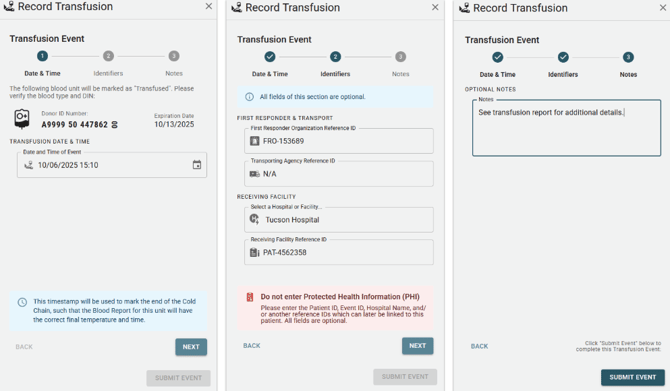
The Transfusion event is used to record that a blood unit has been transfused into a patient. This event is used to record the end of a blood unit's cold chain, and to record non-PHI identifiers which may be used to link to the patient record at a later time.
Each of the following are optional fields, and may be left blank if not applicable. They represent identifiers which may be used to link the blood unit to a specific event or patient. For example, this may be an event identifier, a date and time of the event, or another unique ID.
- First Responder Organization Reference ID (Optional)
This identifier is for the First Responder Organization (FRO), which may or may not be the same as the Transporting Agency, depending on the situation. - Transporting Agency ID (Optional)
This identifier is for the transporting agency, if the patient was transported by a different organization than the first responders. - Receiving Hospital or Facility (Optional)
The name of the hospital or facility where the patient was delivered to. This is a "Smart Autocomplete" field, and will suggest previously entered facilities as you type. - Receiving Hospital or Facility ID (Optional)
The specific patient or event identifier used by the receiving hospital or facility, if applicable.
This event will end the unit's cold chain. While it is possible to continue to add events to this unit, users will have to confirm that the unit is still within the cold chain.