
How does a Team group Members and devices?
When a user is assigned to a team, they are given access to all devices assigned to that team. They are also able to view other members of their team.
Users may be assigned to multiple teams, enabling them to view members and devices on each of their teams.
Devices may also be assigned to multiple teams, enabling multiple teams to view the same device.
When a new user or device is added to an organization, they are assigned to an 'unassigned' team by default. Any Unassigned users may view unassigned devices and other unassigned users.
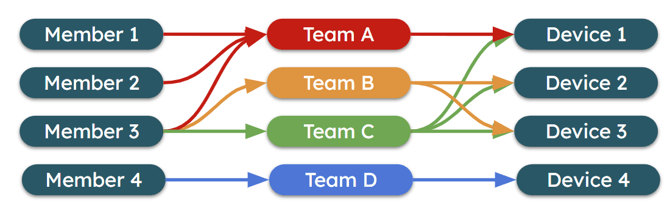
Teams are a many-to-many relationship - both users and devices can be assigned to multiple teams.
How do I create a Team?
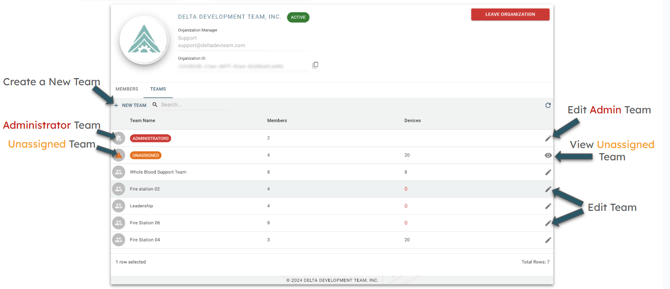
Only Admins can create and manage teams. See below for screenshots of the process:
How do I Edit a team?
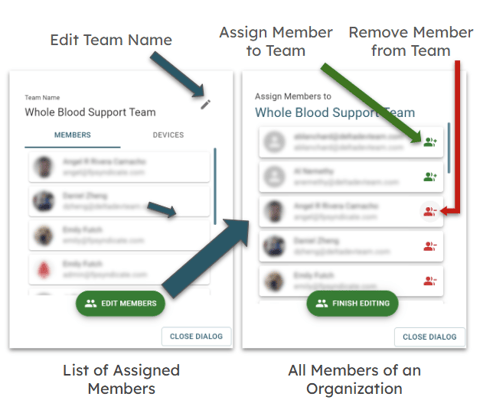
Only Admins can create and manage teams. See below for screenshots of the process:
What is the Admin Team?
The admin team is a special team that is automatically created when an organization is created. It is used to assign users to the Admin permission level, granting them access to all devices within the organization. It also enables them to approve or remove users from the organization, as well as create and manage teams.
Is there a limit on number of teams?
No, the Team system is designed to be flexible to suit the needs of your organization.