
A BloodCOMM subscription is required to access any device via the internet.
A subscription is not required for Bluetooth connectivity.
How do subscriptions work?
A BloodCOMM Subscription is a set of licenses which can be assigned to devices. Each license allows that device to connect to the BloodCOMM Cloud, be monitored remotely, and send alerts.
A subscription can have multiple licenses, and an organization can have multiple active and/or overlapping subscriptions at any given time.
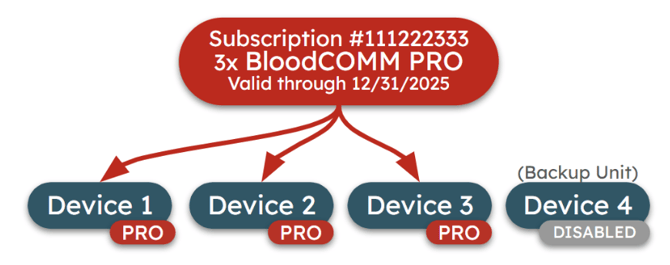
Admins and managers may view all current and past subscriptions on the Subscriptions tab of the Settings. This will display which devices are assigned to which licenses, when they were last activated, and more.
Subscription
Each Subscription includes a certain number of Licenses, which may be used for any cloud-enabled devices within an organization's fleet.
A time-limited set of Licenses which will grant Online BloodCOMM access throughout its duration. Each Subscription is for one Tier of BloodCOMM (PRO, PREMIUM, etc). An organization may have multiple and/or overlapping subscriptions to meet unique needs.
License
A digital, floating key which may be transferred between devices within BloodCOMM. When assigned to a Device, the license allows for online access of that device. Licenses are generic and can be used on any cloud-enabled device, as well as transferred between devices.
How many Licenses does my Organization need?
Licenses are required for online / cloud access to devices within BloodCOMM. Each device which must be accessed online requires a license. As licenses are floating, they are able to be transferred between devices. This allows for an organization which has 10 devices but only regularly uses 8 of them, to purchase only 8 licenses. Then, when a backup unit is brought out of storage, a license can be transferred to it from one of the active licenses.
A license must be purchased for every "in use" device which requires online access.
What happens when my subscription expires?
Each subscription has a set time period and will expire at the end of the time period. Please purchase a new subscription prior to your expiration date in order to retain online access.
Once a subscription expires, all devices which are licensed to that subscription will lose online access.
Can I purchase additional licenses or subscriptions?
Yes, licenses and subscriptions are very flexible. When purchasing an additional device, various options regarding BloodCOMM subscriptions are available.
Additional licenses can be added to existing subscriptions on a prorated basis, and new subscriptions with their own expiration date can be purchased (such that a new device purchase has an entire year of access, for example).
Organizations can have separate and overlapping subscriptions, allowing access or payments to be managed as needed.
Will adding additional Members or Admins affect my subscription?
No, subscriptions are only required for device access. This is so that all users within your organization can have access without worrying about additional per-user fees.
Is there a Demo subscription?
Yes, go to the Organization tab and join the below organization. You will be automatically approved and have access to several real Demo devices with BloodCOMM Pro access:
00000000-0000-0000-0000-000000000000
Can I demo BloodCOMM Premium features?
Yes, please reach out to sales@deltadevteam.com to schedule either a physical or a virtual hardware demo. Paired with the Training Label Generator, all features of Blood Management are able to be tested.