
The Charts page displays multiple, fully interactive charts.
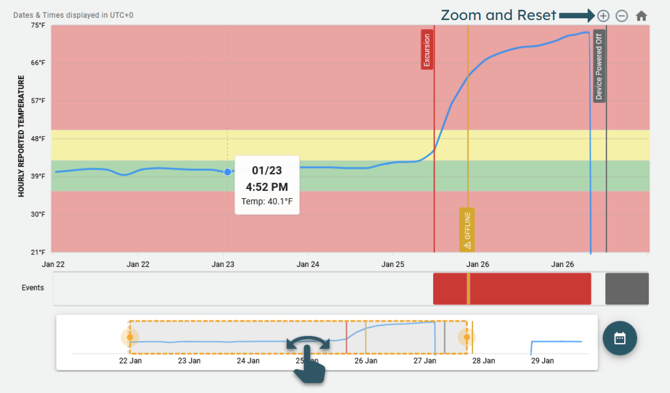
Hourly Temperature
A complex chart, consisting of:
- Temperature data, displayed as a line chart.
- Events, displayed as line chart annotations, and on the Events Timeline.
- An Events Timeline, showing the time and type of each event.
- A Scrubber, allowing users to move the displayed data, zoom in/out, and see an overview.
On mobile devices, the scrubber can be used to pan the chart left and right, but the zoom buttons at the top right of the chart must be used to zoom in/out.
Daily Temperature
A candlestick chart (similar to a stock ticker chart), displaying:
- Minimum and maximum temperature for each day.
- Days where the temperature remains within excursion limits will be GREEN.
- Days which contain at least one excursion event will be colored RED.
- A Scrubber, allowing users to move the displayed data, zoom in/out, and see an overview.
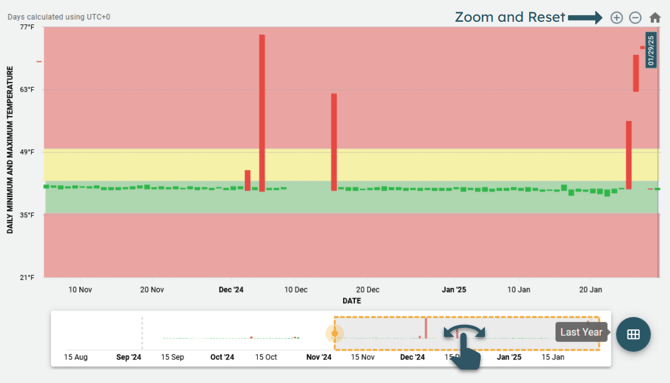
On mobile devices, the scrubber can be used to pan the chart left and right, but the zoom buttons at the top right of the chart must be used to zoom in/out.