
Permission Levels:
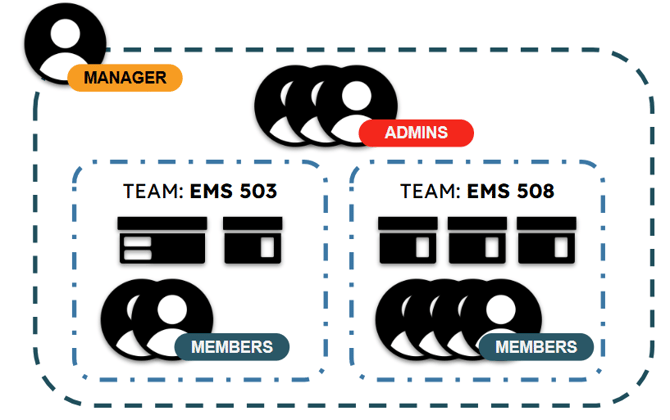
The overall Manager of an Organization. Has access to all devices, all members, to create and edit teams, edit organization properties, and subscription information. Each organization can only have one Manager.
Organization Administrators, assigned via the "Admin" Team. Has access to all devices, all members, to create and edit teams, and subscription information. Each organization can have multiple admins.
Team Members have access to view teammates, view organization admins, and to access devices which have been assigned to their teams.
The first person to join an organization is automatically assigned the Manager role. The manager can be changed by "reassigning" the manager via the current Manager's account.
How are permissions changed?
See the next article, entitled "Teams" for more information on how to change permissions.
Can all of my users be admins?
Yes, you may setup your organizational structure as best fits your needs. The various permission levels are designed to allow you to customize access, especially for larger organizations where individual users should not be able to access all devices.
Can my Organization ID be changed?
No, Organization IDs are unique and cannot be changed.