
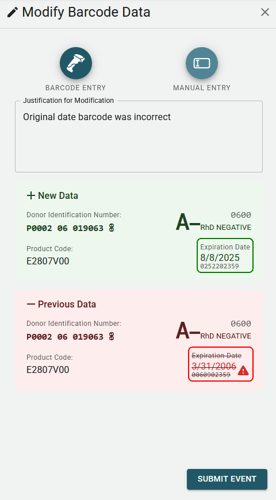
This event should only be used in the event of a data entry error, in order to correct the the barcode data, such as DIN, Blood Type, Product Code, and Expiration Date.
Modification
The Barcode Modification event allows for incorrect, mistyped, or otherwise invalid data to be corrected. This event is not used to change the physical location of a blood unit, or to change the temperature of a blood unit.
All changes to the data are logged in the system, and are visible to all users.
The DIN is the unique identifier of the blood unit, and is not editable.
In order to modify, do the following:
- Select the blood unit to modify.
- Click on the Modify Event button.
- Select the type of Data Entry (AI Scan, Barcode Scan, or Manual Entry).
- Scan or enter the corrected data.
- Review the previewed changes, with the old data being crossed out and the new data highlighted.
- (Mandatory) Enter a justification for why the data was modified.
- Click on the Submit button.