
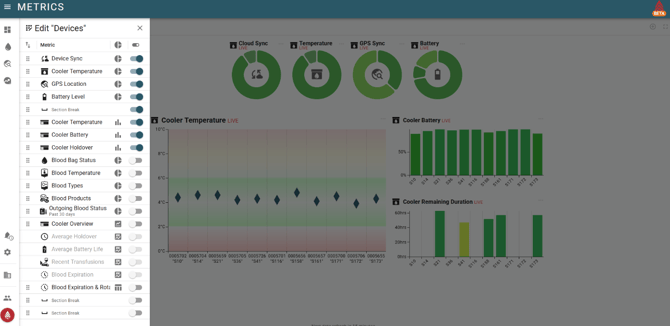
Each dashboard page can be customized to fit your needs. To edit a dashboard, click the icon in the bottom left corner. This will open a sidebar showing a list of all available metrics for that dashboard.
In the sidebar, you can:
- Enable or disable metrics by toggling the switch next to each metric.
- Rearrange metrics by dragging them into your preferred order.
Customizations are stored locally on your computer or mobile device, and are not saved to your account. This means each device can have its own dashboard layout and metric selection.
Individual Metric Customization
Many metrics offer additional customization options:
- Adjust the size of a metric to better fit your dashboard.
- Some metrics have customizable settings, such as thresholds, units, or display options.
- Access these options by clicking the three dots on a metric.
These settings allow you to tailor the dashboard to display the most relevant information for your workflow.
Dashboard and metric customizations are device-specific and will not sync across accounts. For questions or requests for additional customization options, contact support@deltadevteam.com