
Prior to using the inspection event, please ensure that it is your Organization's policy to perform regular inspections. Contact your Blood Program Manager or Blood Bank for more information.
Inspection
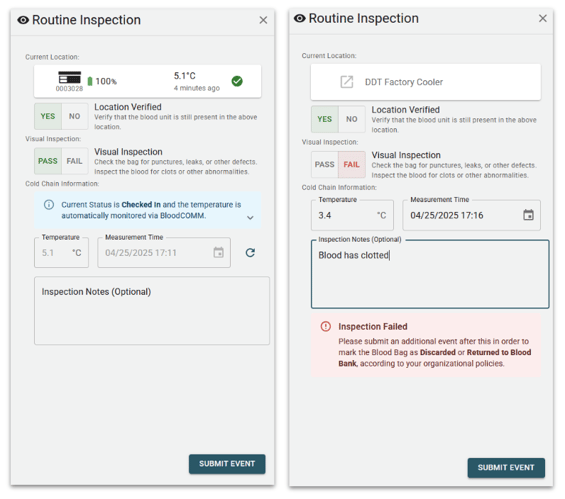
"Inspection" is the process of recording that a blood unit is in the correct location, is in good condition, and is in a valid temperature range.
While inspecting, the following information is verified:
- Current Location of the Blood Unit.
- Visual Inspection of the Blood Bag (for damage, clotting, etc.)
- Temperature of the cooler.
- Time of the temperature measurement.
Incorrect Location
If the blood unit is in an incorrect location, the event is not able to be submitted. The user will be prompted to cancel the inspection event and add a new event to update the location of the blood unit.
While Checked In
If the blood unit is currently checked in, the temperature and time of measurement is automatically filled in. The entered temperature will be appended to the blood unit's Cold Chain and Temperature Record.
If the cooler is offline, the user will be prompted to either manually enter the temperature, or to accept the (outdated) temperature of the cooler.
If desired, users may choose to override the automatic temperature measurement and use a separate Temperature probe to measure the temperature of the cooler.
While Checked Out
If the blood unit is currently checked out, the temperature and time of measurement is not automatically filled in. The user will be prompted to enter the temperature and time of measurement.
The Inspection event is the only way to record a blood unit's temperature while it is checked out. The entered temperature will be appended to the blood unit's Cold Chain and Temperature Record.