
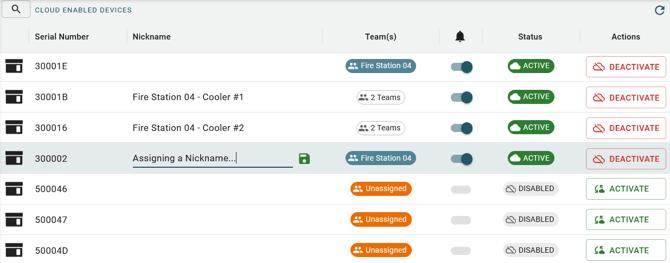
Only Admins and Managers are able to activate, deactivate, and assign devices to teams.
Admins will see all devices within their organization. Members will only see devices assigned to their team(s).
Serial Number and Nickname
Devices within BloodCOMM are identified by their serial number. You can assign a nickname to each device to make it easier to identify.
To assign a nickname, tap or hover on the nickname column and click the pencil icon. Enter the nickname and click the green save symbol to save the nickname.
Nicknames are visible throughout the entire app to assist with identifying devices, and are visible to all other users in your organization.
Team(s)
Which team or teams this device is assigned to. Members on this team will be able to monitor and access this device.
Status and Actions (Cloud Only)
Cloud devices are able to be deactivated and activated. Deactivating a device will block online access to the device, but the device will still be able to collect data.