
Checking Out or External Transfer
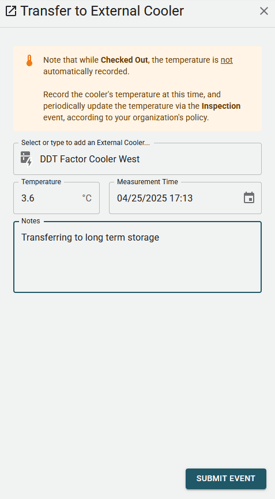
"Checking out" is the process of recording that a blood unit has has been placed inside of a non-BloodCOMM-enabled cooler. If the blood unit is already inside of a non-BloodCOMM-enabled cooler, it is called "External Transferring".
The check out event will prompt the user to record the following information:
- Name of the cooler that the blood unit is being moved to.
- Location of the cooler that the blood unit is being moved to.
- Temperature of the external cooler.
- Time of the temperature measurement of the external cooler.
The External Cooler field is a "Smart Autocomplete" field, which means that it will suggest coolers that have been previously used. If you do not see the cooler you are looking for, you may enter a new cooler name and press enter. This will open a new dialog prompting you to enter the cooler's Name and Location.
After Checking Out
After checking out, place the blood unit inside of the cooler. The entered temperature will be appended to the blood unit's Cold Chain and Temperature Record.
Updating the Temperature
While a unit is Checked Out, the temperature of the cooler is not automatically recorded. If the temperature of the cooler changes, or the policy dictates a regular recording interval, the temperature can be periodically updated by submitting an Inspection event.