
Checking In or Transferring
"Checking in" is the process of recording that a blood unit has has been placed inside of a BloodCOMM-enabled cooler. If the blood unit is already inside of a BloodCOMM-enabled cooler, it is called "Transferring".
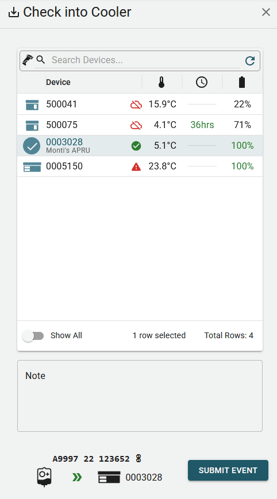
The check in event will will prompt the user to select a cooler to check the blood unit into.
Only coolers which have an active BloodCOMM Premium license are able to be selected. If you do not see the cooler you are looking for, you may click the "Show All" button, which will have an indicator why the cooler is not available.
Contact an Organization Admin for help with getting a Premium license for your device.
After Checking In
After checking in, place the blood unit inside of the cooler. The temperature of the cooler will now be associated with the blood unit, and displayed on the Blood Dashboard.
The temperature will also automatically be recorded to the Blood Unit's Temperature Record, which is a complete history of the temperature of the blood unit.