
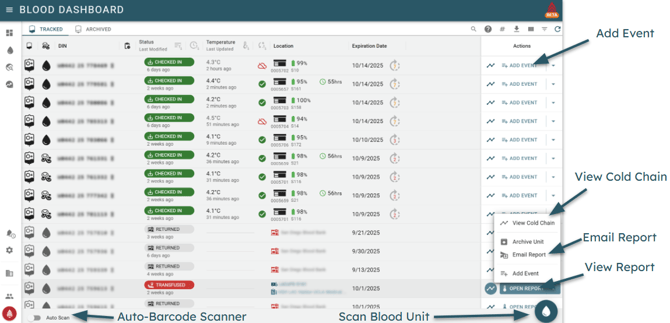
The Blood Unit list displays all blood units registered with their current location, status, expiration date, and more. All of the data is easy to sort, search, export, and filter.
For each Blood Unit, the following data is displayed (left to right):
- Blood Type (ABO)
- Product Type (Whole Blood, RBC, Plasma, Platelets, etc.)
- Donor Information Number (DIN)
- Action Items (due for inspection, expiring soon, etc.)
- Current Status
- Last Updated
- Current Temperature (automatically updated for BloodCOMM enabled coolers)
- Last Temperature Update
- Current Location:
- Cooler status (Checked In)
- External Cooler Name (Checked Out)
- Transfusion Identifiers (Transfused)
- Expiration Date
- Days until Rotation (if applicable)
Automatic Barcode Scanner
The Blood Unit List also includes an optional automatic scanner at the bottom left of the screen. When enabled, the scanner will automatically scan any ISBT-128 DIN, and will open the Cold Chain or will initialize the Registration process, as applicable. This scanner works with any barcode reader, and as long as the user is clicked into the browser window.
The auto scanner requires the window to have focus - if it does not display "Scanner Active", click back into the window to enable it.
Unavailable / Unlicensed / External Coolers
As an individual Blood Unit is able to be transferred between multiple coolers, teams, and organizations. The Blood Unit list will always display the current location of the unit. However in some Checked In situations the device status (temperature, battery, etc.) may not be available. This is due to the following reasons:
- Devices which are not assigned to your Team.
- Devices which have had their license transferred or expired.
- Devices which are a part of a different organization.
For each of the above cases, the Blood Unit list will display the current location of the unit, and will allow you to view the Cold Chain. However, the current status of the unit will not be able to be displayed on your account.
Users with the appropriate permissions will be able to view the current status of the Checked In device.
The Cold Chain and Blood Unit Report will always be available, regardless of the current status of the Checked In device.