
Shipping Blood
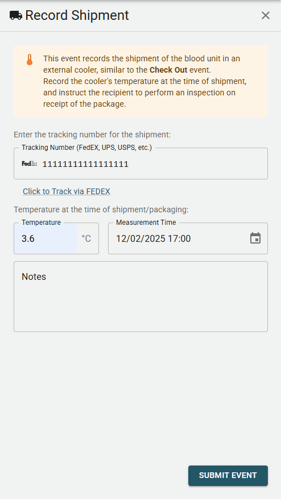
This event documents the shipment of a blood unit in an external cooler, similar to the Check Out event. Record the cooler's temperature at the time of shipment, and instruct the recipient to perform an inspection upon receipt of the package.
The Shipment event will prompt the user to record the following information:
- Tracking number for the package containing the blood unit.
- Temperature of the blood unit at the time of packing.
- Time of packing.
On the Blood Dashboard and on the blood unit's timeline, tracking numbers will be displayed as clickable links that direct users to the courier's tracking page, if a courier can be identified from the tracking number format.
When to use this Event
Use the Shipment event when using a courier service to transport a blood unit between facilities, such as shipping blood from a Blood Bank to your EMS Agency. This event allows you to document the temperature of the blood before shipping, track how long the package is in transit, and record the temperature after delivery.
How to Ship
Place the blood unit inside an insulated package according to your organization's guidelines and ship it with your chosen courier. Submit a Shipment event via the app or website. The entered temperature will be appended to the blood unit's Cold Chain and Temperature Record, and the blood unit's status will be updated to "Shipped".
The general workflow for shipping blood is as follows:
- At the sending facility, pack the blood unit in an insulated box and record a Shipment event with the packing temperature & tracking number.
- Ship the package via your chosen courier service
- At the receiving facility, upon delivery, record an Inspection event with the delivery temperature to complete the cold chain record.
This will result in a complete cold chain record showing the temperature before shipping, the duration of transit, and the temperature upon delivery.
Updating the Temperature
While a blood unit is being shipped, the temperature of the cooler is not automatically recorded. Upon delivery, the recipient should update the temperature by submitting an Inspection event.
Note: The Shipment event does not record temperature data during transit. If you are shipping using a smart cooler with built-in temperature logging, please contact Delta Support to explore integration options.