
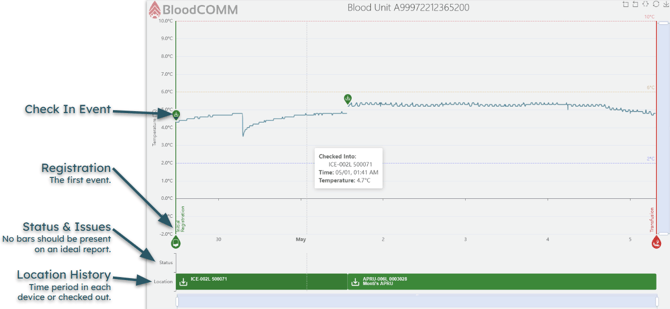
Report charts are a powerful tool for visualizing the history of a blood unit, and give instant visual feedback to the condition of the blood unit.
The charts display:
- Automatically recorded temperature data (via the Check In event)
- Manually recorded temperature data (via the Check Out/Inspect events)
- All Events, annotated over time.
- Highlighted excursions, with color indicators and Status bars.
- The location of the blood unit over time, showing at which time it was in which cooler.
While the above chart is for an "ideal" blood unit, the charts are capable of displaying extremely complex temperature history. Complexities can include multiple devices, organizations, unlimited manual temperature readings, and more.
For example, the following chart shows a blood unit which was moved between multiple coolers, and had multiple manual temperature readings taken. The coolers also had periods of time where the data was not reported, indicating when to investigate further.
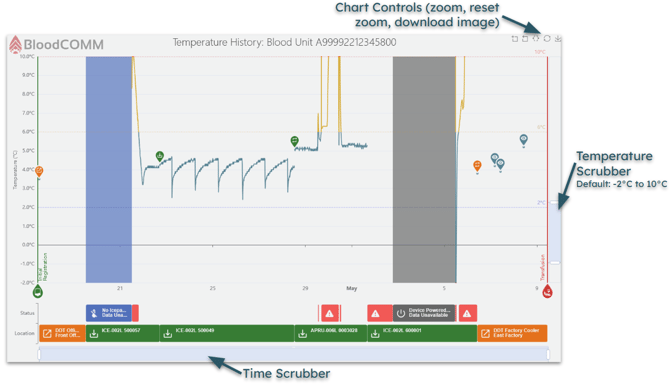
Chart Controls
The chart is fully interactive, and can be zoomed in and out with the mouse wheel, and panned with the mouse. The chart can also be exported (in the current state) as a PNG image.
- Mouse wheel: Zoom In/Out
- Mouse Hover: Show tooltip with details
- Left Mouse Button: Pan forwards and back in time
- Bottom Scrubber: Pan forwards and back in time
- Right Scrubber: Zoom in/out on the Temperature Axis
- The default temperature limits are -2°C to 10°C, but can be adjusted to display any excursions.