
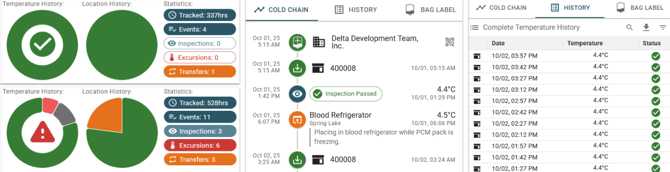
The left panel of the Blood Report displays key statistics, a copy of the Cold Chain Timeline, a complete list of all temperature measurements and events, and a replica of the unit label.
Statistics
For each blood unit, two pie charts are automatically generated: one representing the overall status and another depicting the location history. These charts are updated in real time as the unit is moved and registered.
The pie charts display:
- A green check mark if no issues are detected
- A red warning symbol if any issues are present
- Total hours within the acceptable temperature range
- Hours spent in hot or cold excursions
- Hours with missing or unmeasured temperature data
- Total hours checked in versus checked out
Additional tracked statistics include:
- Total time in cold chain
- Total number of events
- Number of inspections
- Number of excursions
- Number of transfers (check in/out)
Cold Chain Timeline
This section includes a copy of the Cold Chain Timeline for the blood unit, identical to the timeline presented on the Dashboard. Click here for more information about the Cold Chain Timeline.
Temperature History
The temperature history table contains every recorded temperature, event, and timestamp associated with the blood unit, similar to the device history table.
The table includes:
- Timestamp of each measurement or event
- Type of event (e.g., temperature, check in/out)
- Temperature at the recorded time
- Alerts or warnings for excursions or other issues