
Blood Management is a part of the BloodCOMM Premium Subscription, and is not available with BloodCOMM Pro.
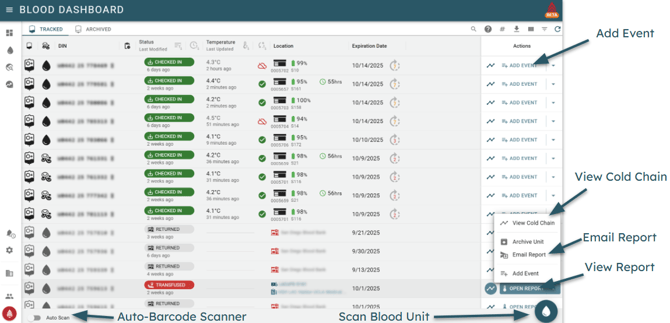
- Register any ISBT-128 compliant Blood Bags, including whole blood, red blood cells, platelets, plasma, and more.
- Automatically track the temperature of blood units, and receive alerts if the temperature is outside of the acceptable range.
- Track the full cold chain on a per-bag basis, including who performed each action at what time.
- Track usage and wastage of blood units, including the reason for wastage.
- Manually enter temperature data for non-BloodCOMM enabled coolers.
- Generate full cold chain reports (Web, PDF, or CSV) for each Blood Unit, allowing for ease of audit and compliance.
- Annotate the cold chain with notes, including the reason for any temperature excursions.
- ...and much more!
How it works
The Blood Management system is designed to be simple and easy to use. Any Blood Bag with an ISBT-128 compliant label can be registered in the system. Once registered, the system allows it to be "Checked In" to a cooler and have the temperature automatically tracked.
Blood Units are able to be tracked between multiple coolers and Organizations. This allows for easy transfer of blood units between organizations, while still maintaining a continuous cold chain.
Cold Chain
The Cold Chain is the continuous history of location, temperature, inspections, and more. Each unit of blood has a unique cold chain and is able to be tracked between multiple coolers and organizations. The cold chain is able to be added to using Blood Events.
Blood Events
Blood Events are the actions performed on a blood unit. These include:
- Check In to BloodCOMM enabled cooler
- Check Out to non-BloodCOMM enabled cooler
- Manual temperature & unit inspection
- Transfusion Tracking
- Blood Rotation Program support
- Automated Report PDF Emailing
- ... and more!
Blood Unit Report
The Blood Unit Report is the full history of a blood unit. This includes the full cold chain, including all blood events, temperature data, and more. The report is available in Web, PDF, or CSV format.
This report is very similar to a Device report, however it is specific to a blood unit. The report will only display data relevant to the cold chain of the blood unit, removing any extraneous data from the report.
This allows for easy compliance and auditing, as devices which do not contain blood at a given time will be not included in the report.
The Blood Unit report generates a piecewise temperature history, combining the data from multiple devices into a single report. It will also include all Cold Chain events, annotations, manual entries, and more.