Chain Of Custody
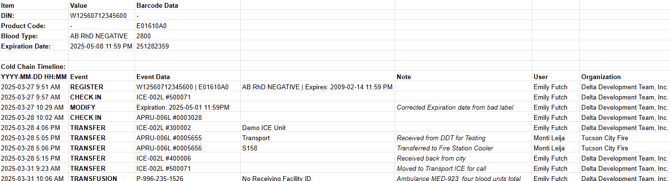
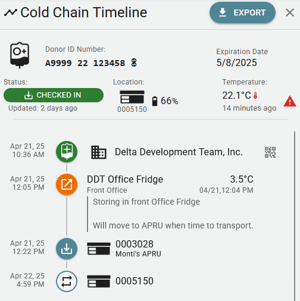
From initial registration to final transfusion, every step of the blood unit's journey is recorded in the system in the form of Events. Each event includes:
- Date and Time the event was submitted.
- BloodCOMM User Account that submitted the event.
- BloodCOMM Organization that submitted the event.
Location History
Specific Events are able to be recorded which allow for updating of the physical location of a blood unit. This allows for tracking of blood units as they are moved between different coolers, transferred back to the Blood Bank, or otherwise moved.
The following events will change the Location.
- Check In or Transfer (to a BloodCOMM-Enabled Cooler)
- Check Out or Transfer External (to a non-BloodCOMM Cooler)
- Transfusion (to a Patient)
- Return to Blood Bank (to a Blood Bank)
- Discard (to a Disposal Location)
Inspection History
Inspection Events are able to be recorded which allow for inspection of the blood unit. This allows for tracking of blood units as they are inspected for temperature, expiration, and other factors.
When Inspecting a Blood Unit, the temperature at the specific time of inspection is recorded. This allows for manual Temperature logging of non-BloodCOMM enabled coolers, as well as secondary temperature logging of BloodCOMM-enabled coolers.
Manual temperature Measurements are not required for BloodCOMM-enabled coolers, as the temperature is automatically recorded by the cooler. Any manual measurements performed will be noted on the Cold Chain, as well as on the Blood Report.
The temperature and user-input time of measurement will display in the Blood Report separately, and will be noted as a Manual Temperature Measurement.
Inspections may not be required by your blood program due to automatic temperature logging. Contact your Blood Program Manager or Blood Bank for more information on how often to inspect blood units.
Temperature History
The temperature of a blood unit is recorded differently, depending on whether the blood unit is in a BloodCOMM-enabled cooler or not.
BloodCOMM-Enabled Coolers automatically record the temperature of the blood unit every 15 minutes. This data is recorded and is accessible in the Blood Bag Report for that specific unit.
Non-BloodCOMM-Enabled Coolers require manual temperature measurements to be recorded. This data is recorded and is accessible in both the Cold Chain the Blood Bag Report for that specific unit.
Other Event History
Other events are for informational purposes, and do not change the location or the status of the blood unit. They are logged to the timeline for tracability and auditing purposes.
These events include:
- Registration and initial Scan Data
- Modification of the Barcode Data
- Sending a Blood Report (via Email)
- Archiving
- Archiving is not appended to the Cold Chain, and only hides the blood bag from the main screen.
Exporting
The Cold Chain is available for export as a CSV. Clicking on the Export button will download the cold chain in the relevant format to your computer or device. This report includes all of the events, inspections, and temperature measurements that have been recorded for a specific blood unit.
Note: The Cold Chain does not contain the full history of the blood unit, but only the events that have been recorded in the system. The full history of the blood unit is available in the Blood Bag Report.